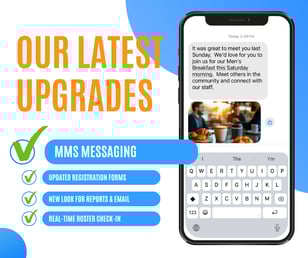
 We released a number of upgrades to the look and feel of Churchteams last night. One of the main ones was Multi Media Messaging (MMS) - a big upgrade for texting.
Almost all apps on smartphones today rely on mobile data plans. Whereas SMS texting only requires cellular access, MMS uses mobile data technology to expand what text messaging apps can do. Churchteams has taken advantage of this functionality to give you the ability to do these three new things.
- Send images. Make your text instantly relatable with a picture of the sender, a flyer, or an image that conveys the emotions or ideas you want people to receive.
- Record and send audio messages. Use the microphone to speak or even sing your message. However, you are limited to 2 minutes.
- Create longer text messages. SMS only allows you to send 159 characters in a text. MMS allows for 1600 characters. This means the content of your text messages can be longer.
If you have texting enabled, select an option to send a text. On the page with the blue filters column select yourself by clicking People > Specific People. Then click Go! and you'll see this new Send Text page that includes MMS.
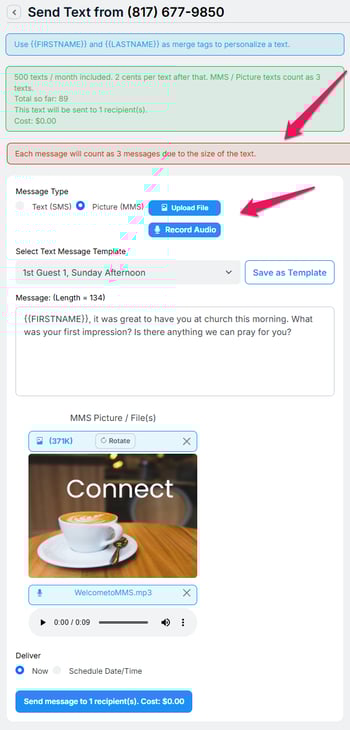 When you click the new Picture (MMS) option, you will see this screen. Instructions in the blue and green shaded area haven't changed.
The new red area alerts you to the fact that MMS texts will count as 3 messages each. That means if you send 10 MMS texts, it will count as 30 texts for billing purposes. The blue "Send message" button gives you the exact cost for any overages.
To help with costs, we have added 3 higher volume texting tiers.
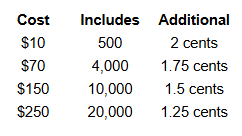
If one these better fits your needs, just email support@churchteams.com and we'll get you set up.
Click the buttons to upload your image or create your recording. You can update current templates to MMS or save new ones. These are great for workflows.
GIFS can be used. Videos generally are not sent via MMS due to size limitations. However, when you add a video link to a text, most messaging apps will provide a nice preview image.
If you are a client and Text-to-Church is not enabled, click the "Find a phone number" link on the bottom of the homescreen and follow instructions to get set up. We recommend using your church office number - yes, even if it's a landline!
If you are not a client, we would love to help you solve that problem too.